Business teams want AI agents that can look up account data, trigger workflows, and assist operators inside the same systems employees already use. The hard part is not the model—it is connecting agents to CRM, ERP, ticketing, and internal APIs without creating a fragile web of one-off integrations. Model Context Protocol (MCP) is an open protocol designed to standardize how AI applications connect to external data sources and tools. For enterprise leaders, the question is not whether MCP is interesting—it is whether it belongs in a governed production architecture.
Introduction
What problem does MCP address for businesses? Most organizations already have APIs, SaaS platforms, and internal services. AI agents need a consistent, inspectable way to discover context, call tools, and operate within permission boundaries. Without a standard connection layer, every agent project rebuilds custom glue code—different auth flows, different tool schemas, and different audit patterns. MCP defines a shared model for that connection layer so teams can focus on workflow design, policy, and operational controls instead of reinventing integrations for each use case.
What is Model Context Protocol (MCP)?
Model Context Protocol (MCP) is an open protocol that enables integration between LLM applications and external data sources and tools. The official specification describes MCP as a standardized way for AI-powered applications to share contextual information, expose capabilities, and build composable integrations.
In practical terms, MCP separates three roles:
- Host — the AI application the user interacts with (for example, an internal copilot or agent platform).
- Client — a connector inside the host that maintains a connection to an MCP server.
- Server — a service that exposes business context and capabilities to the host through the protocol.
Communication uses JSON-RPC 2.0 messages. Servers can expose:
- Resources — contextual data for the user or model (documents, records, configuration).
- Prompts — templated messages and workflows.
- Tools — functions the model can invoke to take action in connected systems.
Clients may also offer sampling capabilities that allow server-initiated model interactions, subject to user approval in well-designed implementations.
MCP is not a replacement for your CRM, ERP, or databases. It is the connection standard between an AI host and the adapters that reach those systems.
How does MCP work in an enterprise architecture?
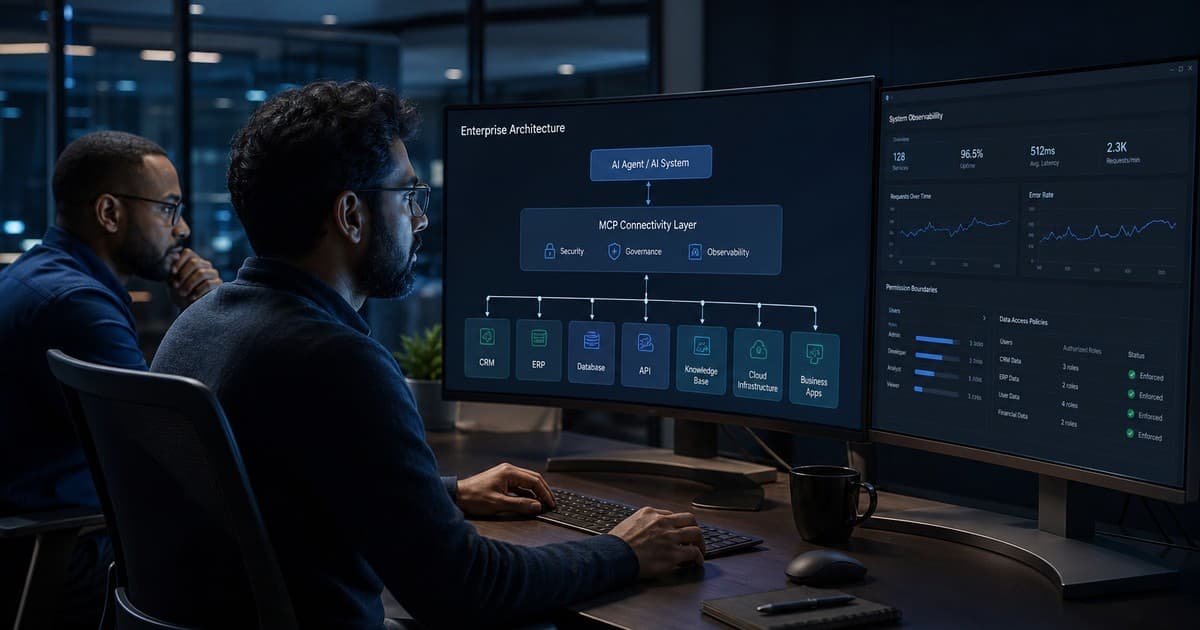
In a typical enterprise deployment, MCP sits between the agent host and a set of controlled adapters:
- An employee or automated workflow triggers an AI agent inside an approved host application.
- The host's MCP client connects to one or more MCP servers scoped to specific business domains—support, sales operations, finance, engineering tools.
- Each MCP server wraps existing APIs, databases, or SaaS integrations behind a consistent tool and resource interface.
- The host applies policy, logging, and approval rules before tools execute, especially for high-impact actions.
- Results return through the same channel, with audit records stored by the enterprise platform—not only by the model vendor.
This pattern aligns with how mature teams already think about integration: bounded services, explicit permissions, and observable actions. MCP adds a shared vocabulary for agent-facing capabilities so multiple teams can reuse servers instead of building isolated agent connectors.
For organizations evaluating multi-agent or agentic architectures, MCP can reduce fragmentation. Different agents can connect to the same governed servers, provided access control is enforced at the server and identity layers—not assumed from the model prompt alone.
Why does MCP matter for AI agents?
AI agents for business automation become useful when they can retrieve context and act across systems. MCP matters because it standardizes that boundary:
- Tool discovery — agents can enumerate available capabilities through a consistent interface instead of hard-coded function lists per project.
- Separation of concerns — domain teams can own MCP servers for CRM, ERP, or internal knowledge while platform teams own host policy and observability.
- Composable expansion — new business capabilities can be added as servers without rewriting the entire agent stack.
- Vendor-neutral integration — MCP is an open protocol, which helps avoid locking agent connectivity to a single model provider's proprietary connector format.
MCP does not remove the need for workflow design, AI governance, or observability. It defines how connections are structured so those controls can be applied consistently.
MCP vs traditional API integration
Direct API integrations remain essential in every enterprise stack. MCP addresses a different layer: how AI hosts discover and invoke capabilities safely and consistently.
| Dimension | Traditional API integration | MCP-based agent integration |
|---|---|---|
| Primary consumer | Application services, scripts, ETL jobs | AI hosts and agent runtimes |
| Interface style | REST, GraphQL, SDKs, webhooks per vendor | Standardized tools, resources, and prompts via MCP |
| Discovery | Documented in internal wizards or code | Enumerated at runtime by the host through MCP |
| Governance focus | Service accounts, scopes, rate limits | Tool consent, host policy, server-side authorization, audit trails |
| Change management | Versioned API contracts | Server versioning plus tool schema validation |
| Best fit | Deterministic service-to-service workflows | Agent workflows needing dynamic tool selection |
| Risk profile | Well understood when scoped correctly | Additional model-layer risks (prompt injection, tool misuse) |
Many production architectures use both: conventional API integrations for core transactional systems, and MCP servers as the agent-facing gateway on top of those APIs.
Enterprise use cases
MCP is most credible when it wraps real systems teams already operate—not hypothetical "AI platforms."
CRM and sales operations
Agents can retrieve account context, prepare follow-up drafts, or propose record updates. High-impact writes should remain behind approval and permission checks enforced outside the model.
Customer support
Support agents can summarize tickets, retrieve policy snippets, and suggest next steps by connecting to helpdesk and knowledge systems through governed MCP servers.
ERP and finance workflows
Read-only lookups—invoice status, vendor records, approval queues—are strong starting points. Payment or ledger changes require stricter controls and human checkpoints.
Internal knowledge and document systems
Agents can query approved repositories rather than the open web. Access control must match source-system permissions, not broader model defaults.
Software engineering and data platforms
Engineering copilots can connect to repositories, CI systems, or internal data catalogs. Tool safety is especially important when actions could modify production assets.
Operations and event-driven automation
Agents can react to operational signals when combined with queues and workflow engines, provided idempotency, retries, and audit trails are designed explicitly.
Security and governance risks
The MCP specification explicitly warns that the protocol enables powerful capabilities—including data access and code execution paths—and that implementors must address security and trust carefully. Enterprise teams should plan for these risks from the start:
Prompt injection and tool poisoning
Attackers or untrusted content may attempt to manipulate an agent into calling tools with unsafe parameters. The specification notes that tool descriptions and annotations should be treated as untrusted unless they come from a trusted server. Hosts should validate inputs, restrict tool scope, and avoid over-trusting model-selected arguments.
Over-permissioned tools
A tool that can both read and write broadly effectively grants the model broad system power. Apply least privilege at the server and identity layers.
Weak consent and authorization
The specification requires explicit user consent for data access and tool invocation in conforming designs. Enterprise deployments should not hide consequential actions behind opaque defaults.
Insufficient logging
Without structured logs tying user identity, tool calls, parameters, and outcomes together, incident response and compliance reviews become difficult. AI observability is not optional for production agents.
Legacy system exposure
MCP can wrap legacy APIs, but it does not modernize weak authentication or missing audit trails underneath. The underlying system's controls still matter.
Confused-deputy and token-scope problems
When OAuth or enterprise identity flows are used, tokens must be scoped to the intended server and operation. Emerging MCP authorization extensions such as Enterprise-Managed Authorization (EMA) aim to centralize access decisions through corporate identity providers—worth evaluating for larger deployments.
Enterprise MCP security checklist
Use this checklist when moving from a pilot to production:
- Inventory tools and resources — document what each MCP server exposes and why.
- Apply least privilege — separate read-only and write tools; narrow scopes per role.
- Require explicit consent — users understand when tools access data or take action.
- Add human approval — gate external messages, financial changes, and bulk updates.
- Validate tool inputs — schema-check arguments; reject out-of-policy requests.
- Treat tool metadata as untrusted — harden hosts against prompt injection and tool poisoning.
- Centralize identity — integrate with corporate IdP; evaluate EMA where available.
- Enforce TLS and secrets hygiene — protect credentials, rotate keys, segregate environments.
- Log every tool invocation — capture actor, inputs, result, and approval status.
- Monitor anomalies — alert on unusual tool frequency, failures, or scope violations.
- Plan rollback — disable servers or tools quickly without redeploying the entire agent platform.
- Test failure modes — timeouts, partial data, duplicate calls, and unauthorized access attempts.
Recommended production architecture
A production-ready MCP deployment typically includes:
- Host policy layer — determines which servers, tools, and resources each user or agent profile may access.
- MCP servers as adapters — wrap internal APIs with narrow, testable tool definitions.
- Identity and authorization — map corporate users and service accounts to server permissions.
- Approval workflow — pauses high-impact tool calls for human review where required.
- Observability pipeline — metrics, structured logs, and trace correlation across host and servers.
- Environment separation — distinct servers for development, staging, and production data.
- Change control — versioned tool schemas and documented release processes for server updates.
This mirrors how teams deploy conventional integrations—MCP adds a standardized agent interface on top.
When should a business use MCP?
MCP is a strong fit when most of these criteria apply:
- You are deploying AI agents that need dynamic access to multiple internal or SaaS systems.
- Multiple teams will build agent capabilities and need a shared connection standard.
- You want to separate host policy from domain integrations owned by business units.
- You can invest in governance, logging, and identity alongside connectivity.
- Your use cases benefit from runtime tool discovery rather than fixed service orchestration alone.
If only one simple integration is needed and no agent host is involved, direct APIs may remain the better path.
When MCP may not be the right choice
Consider conventional integration or batch processing instead when:
- The workflow is fully deterministic with no agent reasoning step.
- A single API connection satisfies the requirement with minimal maintenance overhead.
- Regulatory constraints demand bespoke audit models MCP hosts do not yet support in your environment.
- Legacy systems cannot be safely exposed even through narrow tools without major remediation.
- The organization lacks capacity to operate and monitor additional integration services.
MCP is a connection and capability layer—not a shortcut around data quality, identity management, or process design.
Practical implementation roadmap
A sensible rollout sequence:
- Select one bounded workflow — for example, read-only support context retrieval or internal document search.
- Map underlying APIs — identify source systems, auth methods, and data sensitivity classes.
- Build a pilot MCP server — expose a minimal, read-only tool set with strict schemas.
- Configure host policy — consent flows, role mapping, logging, and approval gates.
- Run red-team and failure testing — prompt injection attempts, unauthorized tool calls, and timeout behavior.
- Expand tools gradually — add write capabilities only with explicit approvals and audit coverage.
- Operationalize — on-call ownership, dashboards, server versioning, and decommission procedures.
Teams comparing AI agents vs agentic AI should apply the same discipline: start with a narrow, measurable workflow before expanding orchestration complexity.
FAQ
Is MCP an API replacement?
No. MCP standardizes how AI hosts connect to tools and resources. Underneath, MCP servers typically call conventional APIs, databases, and SaaS platforms.
Is MCP secure enough for enterprise use?
MCP defines security principles—including user consent, data privacy controls, and tool safety expectations—but enterprise security depends on implementation. Production use requires least privilege, identity integration, logging, approval workflows, and ongoing monitoring.
What is an MCP server in business terms?
An MCP server is a controlled adapter that exposes approved data and actions from business systems to an AI host through a standardized interface.
Can MCP connect AI agents to CRM or ERP systems?
Yes, when teams build or deploy MCP servers that wrap those systems' APIs with appropriate authorization. MCP does not connect automatically—engineers must implement governed adapters.
Does MCP work with legacy systems?
Often yes, via adapters that translate legacy APIs or databases into MCP tools and resources. The legacy system's authentication and audit limitations still apply.
How should businesses control agent permissions?
Combine host-side policy, server-side authorization, corporate identity controls, role-based tool access, and human approval for high-impact actions. Treat tool descriptions as untrusted input unless the server is fully controlled by your organization.
When should a company use MCP instead of a conventional integration?
Use MCP when an AI host needs standardized, discoverable access to multiple tools across domains. Use conventional integrations when deterministic application services—or simple point-to-point APIs—fully satisfy the requirement without an agent layer.
Final thoughts
Model Context Protocol (MCP) gives enterprises a practical standard for connecting AI agents to the systems where work actually happens. It is most valuable when paired with the same production disciplines teams expect from any integration program: clear permissions, explicit approvals, structured logging, and honest scoping of what agents may do autonomously.
If you are evaluating agent connectivity across CRM, ERP, support, or internal platforms, start with one governed workflow, build a narrow MCP server, and prove security and observability before expanding tool access.
Need help designing production-ready agent integrations?
Novapro Lab builds custom software platforms, SaaS systems, and automation infrastructure for teams that want production-ready results—not experiments.
Need a software system like this?
Related articles

AI Agents vs Agentic AI: What's the Difference and When Should Businesses Use Each?
AI agents and agentic AI are related but not the same. Learn how each model works, when enterprises should use them, and how to implement autonomous workflows without losing control.

RAG for Enterprise AI: How Retrieval-Augmented Generation Improves Business Accuracy and Trust
Retrieval-augmented generation connects AI models to your company's knowledge—policies, contracts, product docs, and operational data—so enterprise AI answers are grounded, auditable, and useful in production.
AI Governance for Business Automation: Why Human Approval, Audit Trails, and Clear Rules Matter
AI automation can save time and improve operations, but businesses need approval rules, audit trails, and clear boundaries before allowing AI agents to act.