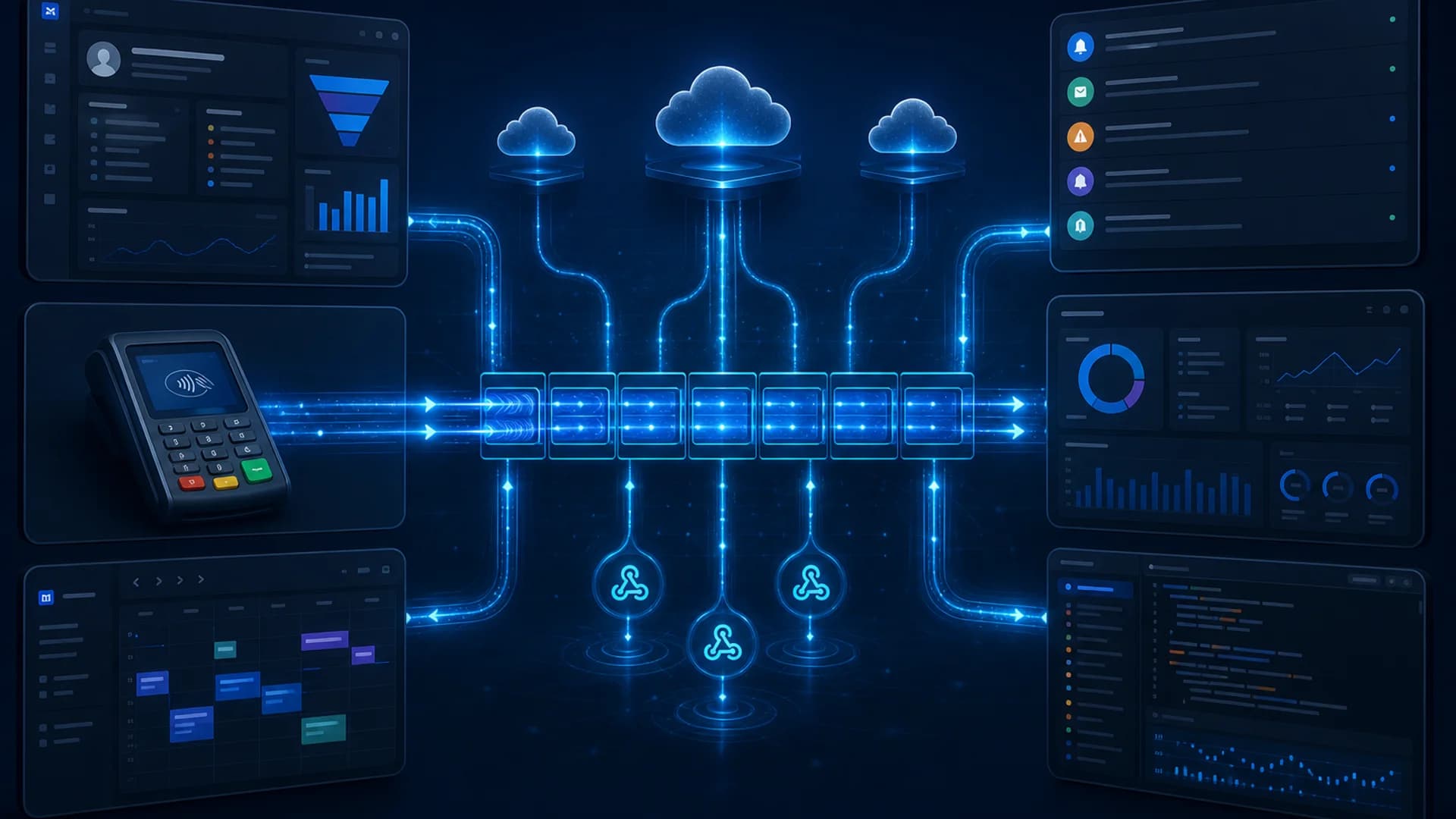
Direct answer: Event-driven architecture for business automation is a way to connect CRM, payments, reservations, notifications, and internal tools so they react to events. Those events are recorded changes such as “order paid” or “appointment booked.” They flow through webhooks, message queues, and asynchronous workflows instead of manual exports or constant API polling.
Growing companies often outgrow spreadsheets and nightly CSV uploads. Operations leaders want systems to stay synchronized. Engineering teams want to avoid brittle point-to-point scripts. Event-driven systems address both needs by separating who detects a change from who responds to it, while still requiring deliberate design for reliability, security, and observability.
Introduction
Business automation rarely fails because teams lack software. It fails because software does not share timely, trustworthy signals. Sales updates a CRM while finance reconciles payments in another tool. Support sends notifications from a third platform. Without a coherent integration strategy, staff copy data by hand or run fragile scripts that break when APIs change.
Event-driven architecture (EDA) offers a practical middle path between ad hoc integrations and heavyweight enterprise middleware. It fits organizations connecting multiple SaaS applications, building custom platforms, or replacing manual transfers with real-time system integration. When combined with solid API integration practices, EDA helps workflows scale without turning every new feature into a custom one-off.
This guide explains EDA from a business and engineering perspective. It covers what events are, when webhooks and queues matter, how asynchronous workflows behave in production, and what reliability patterns decision-makers should expect. These are engineering realities, not marketing promises.
What event-driven architecture means
An event is a message that something happened: a customer submitted a form, a payment succeeded, a vehicle became available, or a ticket escalated. In event-driven architecture, producers publish events to a channel, bus, or queue. Consumers subscribe and run business logic in response.
Core concepts:
- Event producer: the system where the change originates (payment gateway, booking app, CRM)
- Event channel: webhook endpoint, message queue, log stream, or event broker
- Event consumer: automation service, microservice, or integration worker that reacts
- Event schema: agreed fields such as event type, timestamp, entity ID, and payload version
EDA is not a single product. It is a design approach used in event-driven microservices, SaaS automation platforms, and custom backends. The goal is decoupling. Producers do not need to know every downstream system. Consumers can be added or upgraded independently, within the limits of your contracts and monitoring.
Events versus traditional request-response APIs
Traditional APIs often follow request-response. Client A calls Client B and waits for an answer. That works well for queries (“fetch customer profile”) and immediate commands (“create draft invoice”).
Events complement APIs. They fit when:
- Many systems must react to the same change
- The producer should not wait for slow downstream work
- Traffic arrives in bursts
- You want an audit trail of state changes over time
| Pattern | Best for | Trade-off |
|---|---|---|
| Request-response API | Queries, synchronous validation, user-facing actions | Tight coupling; caller waits for all downstream work |
| Event / webhook | Notifications of completed state changes | Delivery retries, duplicates, and ordering require design |
| Message queue | Buffering, fan-out, worker pools | Operational overhead; must monitor queue depth |
| Batch file sync | Legacy systems, low-frequency reconciliation | Higher latency; not real-time |
Most mature architectures combine all three. EDA does not replace REST or GraphQL APIs. It coordinates business system synchronization around changes that already occurred.
How webhooks work in business systems
A webhook is an HTTP callback. When an event occurs, the source system sends a POST request to a URL you control, usually with a JSON payload.
Typical flow:
- Your team registers a webhook URL in the source SaaS product.
- The provider signs or authenticates the request (API key, HMAC signature, or mTLS in advanced setups).
- Your receiver validates the request, acknowledges quickly (often HTTP 200), and enqueues work.
- Background workers process the event and update other systems.
Webhooks for business automation are attractive because they are near real-time and avoid constant polling. They also introduce engineering responsibilities:
- Verify authenticity before trusting payloads
- Respond fast and do heavy work asynchronously
- Handle duplicate deliveries
- Log correlation IDs for support and audit
Webhook failures should trigger alerts and retries according to your provider’s policy. Silent data loss is not acceptable.
When message queues are necessary
A message queue stores events until consumers process them. Examples include cloud-managed queues, Kafka-style logs, and Redis streams, chosen based on volume, ordering needs, and team skills.
Queues become necessary when:
- Event volume exceeds what a single webhook handler can process synchronously
- Multiple services consume the same event at different rates
- You need buffering during downstream maintenance or deploys
- Producers and consumers deploy on independent schedules
Queues support asynchronous workflows. A payment event might trigger fraud review, CRM update, receipt email, and analytics. Each step can run as a separate consumer reading from the same stream or related topics.
Without queues, a spike in bookings or payments can overwhelm a monolithic webhook handler and cause timeouts upstream, even when each individual task is simple.
Synchronous versus asynchronous workflows
Synchronous workflows block until each step completes. A user clicks “Pay,” and the UI waits for payment, inventory, and confirmation email before showing success. Simplicity is high. Resilience under load is lower.
Asynchronous workflows acknowledge the trigger quickly and continue processing in the background. The user might see “Payment received. Confirmation arriving shortly,” while downstream systems catch up.
| Dimension | Synchronous | Asynchronous |
|---|---|---|
| User experience | Immediate final answer | Fast acknowledgment; eventual completion |
| Failure handling | User often sees error immediately | Requires status tracking and notifications |
| Scalability | Limited by slowest step | Better burst tolerance with queues |
| Consistency | Easier to reason about in one request | Requires explicit reconciliation |
Business automation frequently mixes both approaches. Use synchronous validation for money-moving steps. Use asynchronous fan-out for notifications, analytics, and non-critical updates.
Practical business use cases
Reservations and dispatch
When a booking is created or canceled, events update driver assignments, capacity calendars, and partner portals. Real-time events reduce double-bookings compared to hourly sync, provided handlers are idempotent and ordering rules are documented.
CRM and lead management
Marketing forms, chat tools, and product sign-ups can emit “lead.created” events. Sales systems enrich records, assign owners, and trigger follow-up sequences. This extends patterns described in AI agents for business automation without requiring every agent to poll CRM APIs.
Payments and order processing
Payment providers send webhooks for succeeded, failed, or disputed charges. Order systems, fulfillment tools, and accounting platforms consume those events. This is high-stakes automation. Duplicate or missed events directly affect revenue recognition and customer trust.
Customer notifications
SMS, email, and push providers should receive events after core business state is committed. Asynchronous notification workers prevent checkout flows from failing because a third-party messaging API is slow.
Inventory or availability synchronization
E-commerce, rental, and field-service businesses propagate availability changes to marketplaces and mobile apps. Event streams beat nightly batch jobs when overselling carries a real cost, though eventual consistency windows must be communicated to operations.
Reporting and operational dashboards
Analytics pipelines often consume copies of business events to build operational dashboards. Event logs become the source for metrics such as conversion rates, SLA breaches, and queue backlog trends. This pairs well with AI observability practices for automated workflows.
Reliability requirements
Event-driven automation fails in predictable ways unless teams engineer for them explicitly.
Idempotency
Consumers must tolerate duplicate events. Use idempotency keys, deduplication tables, or natural keys (payment intent ID + event type) before creating side effects.
Retries with exponential backoff
Transient network errors and rate limits require retry policies with jittered backoff. Cap maximum attempts and route permanent failures elsewhere.
Duplicate-event handling
Assume duplicates will arrive. Design handlers so a repeated “invoice.paid” event does not send two shipment orders.
Event ordering
Not all platforms guarantee global order. Document per-entity ordering expectations (for example, “all events for order_id 123 are ordered”) and detect out-of-order cases.
Timeouts
Set timeouts on outbound API calls inside consumers. A stuck downstream dependency should not hold worker threads indefinitely.
Dead-letter queues
After exhausting retries, move poison messages to a dead-letter queue (DLQ) for manual inspection and replay. Never drop them silently.
Replayability
Store enough context to reprocess events after bug fixes. Immutable event logs or archived payloads support safe replays with governance.
Correlation IDs
Pass a correlation ID from the original user action through every event and log line. Support teams can trace one customer complaint across five systems in minutes instead of days.
Security and data protection
Events often carry PII, financial metadata, or internal identifiers. Minimum expectations:
- Authenticate webhook sources (signatures, allowlists, secrets rotation)
- Encrypt data in transit (HTTPS) and at rest where stored
- Apply least-privilege access for consumers and operators
- Redact sensitive fields in logs while keeping correlation IDs
- Validate payload schemas before processing
Security controls support compliance efforts, but they do not automatically guarantee regulatory compliance. That depends on your full data governance program.
Observability and audit trails
Operators need visibility beyond “the queue exists.” Monitor:
- Events received, processed, failed, and retried
- Queue depth and age of oldest message
- Processing latency percentiles
- DLQ volume and replay outcomes
- Business KPIs tied to event types (orders confirmed per hour)
Structured logs and metrics enable audit trails for who changed what and when. They are essential when debugging customer-facing incidents or reviewing automated decisions.
Suggested implementation architecture
A pragmatic reference architecture for mid-sized businesses:
- Edge receiver: authenticated webhook endpoint that validates and enqueues
- Message queue or log: durable buffer with retention policy
- Worker services: stateless consumers with idempotent handlers
- Integration API layer: wraps SaaS and internal APIs with rate-limit awareness
- Dead-letter and replay tools: operator UI or scripts for failed events
- Observability stack: metrics, logs, traces, alerts
- Configuration store: event schemas, routing rules, feature flags
Align deployment practices with MVP-to-production discipline. Use separate environments, staged rollouts, and runbooks before promoting changes.
Numbered rollout:
- Document one critical event type and schema version
- Implement receiver, queue, and single consumer
- Add idempotency and correlation IDs
- Instrument dashboards and alerts
- Expand consumers and secondary event types
- Introduce replay tooling and periodic reconciliation jobs
When not to use event-driven architecture
EDA is not always the simplest correct choice. Consider alternatives when:
- Data changes infrequently and batch sync is sufficient
- A single monolithic app owns all state with no external fan-out
- The team lacks operational capacity to monitor queues and DLQs
- Strong synchronous consistency is required in one user-facing transaction
- The SaaS provider offers only unreliable or undocumented webhooks
For early-stage teams, a well-designed request-based integration may deliver value faster than a full event platform.
Common mistakes
Treating webhooks as guaranteed delivery. Providers retry, but you still need durable queues and reconciliation.
No idempotency. Duplicates become duplicate shipments, charges, or messages.
Fat synchronous handlers. Doing all downstream work in the webhook request risks timeouts and cascading failures.
Missing schema versioning. Breaking changes silently corrupt downstream systems.
No DLQ or replay path. Failed events disappear into logs nobody reads.
Ignoring backpressure. Unbounded queues mask systemic failure until recovery is expensive.
Skipping process readiness. Automating undefined business processes amplifies chaos rather than efficiency.
Implementation roadmap
Phase 1: Foundation (weeks 1–2)
Select one workflow, define event contracts, deploy receiver and queue, implement idempotent consumer, add correlation IDs.
Phase 2: Reliability (weeks 3–4)
Add retries, DLQ, alerting on failure rates and queue depth, document runbooks.
Phase 3: Expansion (month 2+)
Add secondary consumers, reporting pipelines, schema registry, environment promotion checks.
Phase 4: Governance (ongoing)
Access reviews, retention policies, replay approvals, cross-team ownership of event catalogs.
Final business recommendations
Event-driven architecture for business automation can improve responsiveness, reduce manual data transfer, and decouple teams when implemented with realistic expectations. It does not automatically deliver zero downtime, perfect consistency, instant processing, or freedom from duplicate events.
Decision-makers should invest in:
- Clear event ownership and schemas
- Idempotent, observable consumers
- Queues or logs where volume and fan-out require them
- Human-visible failure paths (DLQ, alerts, reconciliation)
- Alignment between operations process design and technical routing
Novapro Lab designs and builds custom software, SaaS platforms, API integrations, and production automation architectures. That includes event-driven workflows with the reliability patterns businesses need in real environments.
Ready to connect your systems with dependable event-driven automation? Schedule a consultation with Novapro Lab to review your integrations, webhook flows, and operational requirements.
FAQ
What is event-driven architecture in business automation?
Event-driven architecture connects business systems through published events. Those state changes are consumed via webhooks, queues, or streams, so automation reacts without constant polling or manual transfers.
When should a business use webhooks instead of polling APIs?
Use webhooks when providers support push notifications and you need timely reactions. Use polling or batch jobs when webhooks are unavailable, undocumented, or when near-real-time updates are unnecessary.
Why are message queues important in event-driven systems?
Queues buffer load, decouple producers from consumers, enable retries, and allow multiple services to process events at their own pace. That reduces cascade failures during spikes or maintenance.
What is idempotent event processing?
Idempotent processing ensures repeating the same event does not multiply side effects. It is essential because retries and network behavior commonly produce duplicates.
Does event-driven architecture guarantee real-time consistency?
No. Events improve timeliness and decoupling, but cross-system consistency remains eventual unless you design synchronous checkpoints, reconciliation, and monitoring explicitly.
How should companies start implementing event-driven automation?
Begin with one high-value workflow. Define schemas and correlation IDs, implement durable queues and idempotent handlers, add observability, then expand event types and consumers with tested replay and DLQ procedures.
Need a software system like this?
Related articles

Why API Integrations Matter for Growing Businesses
Growing companies often rely on many tools, but when systems do not communicate, operations slow down. API integrations help connect data, workflows, and business processes.
Model Context Protocol (MCP) for Enterprise AI: How to Connect AI Agents to Business Systems Safely
Model Context Protocol (MCP) gives businesses a standardized way to connect AI agents to CRM, ERP, and internal tools—but production use requires governance, least privilege, and clear security controls.

Customer and Partner Portals for B2B Operations: When Self-Service Software Beats Email and Spreadsheets
B2B customer and partner portals give clients, vendors, and distributors a secure place to submit requests, track status, and exchange documents instead of relying on email threads and spreadsheets.